A reassessment can bring together months of observations, assessment findings and service information. The writing task is to explain how those records support this client’s proposed care. That need is reflected in the August 2026 CMS ABA Toolkit, which describes individualized plans that connect goals, approaches, progress evaluation and service arrangements, and calls attention to generic, copied plans. The toolkit is a resource for state Medicaid and CHIP programs, not a new regulation or a clinical standard of care. CMS ABA Toolkit, pages 7 and 33.
For BCBAs, the practical challenge is making each part of the document specific enough that the next reader can follow the recommendation. ATrack Treatment Plan Generator provides an organized, editable workspace for that work. Available client information supplies a starting point; clinicians check its sources, develop the explanation and review the document as a whole. This walkthrough shows how to move from existing records to a plan your team can examine before submission.
Start With the Assessment Path and Its Sources
In the ATrack Treatment Portal, open the client, choose Treatment Plan Generator, then select New Treatment Plan. Choose the path that fits the document you are preparing:
- Initial Assessment supports documentation without prior clinical data on file.
- Reassessment uses available existing sources to populate relevant areas.
For a reassessment, inspect the sources listed before choosing Create Treatment Plan. In the official walkthrough’s fictional demonstration record, the list includes assessment, clinical service and case information; a prior treatment plan is unavailable. Your client’s available sources may differ.
This check makes the starting point clear. If a previous plan is unavailable, for example, do not assume the draft accounts for its goals or recommendations. Identify the missing information and decide what must be obtained or explained before completing the document. A populated field still needs to be checked against the source and the period you are describing.

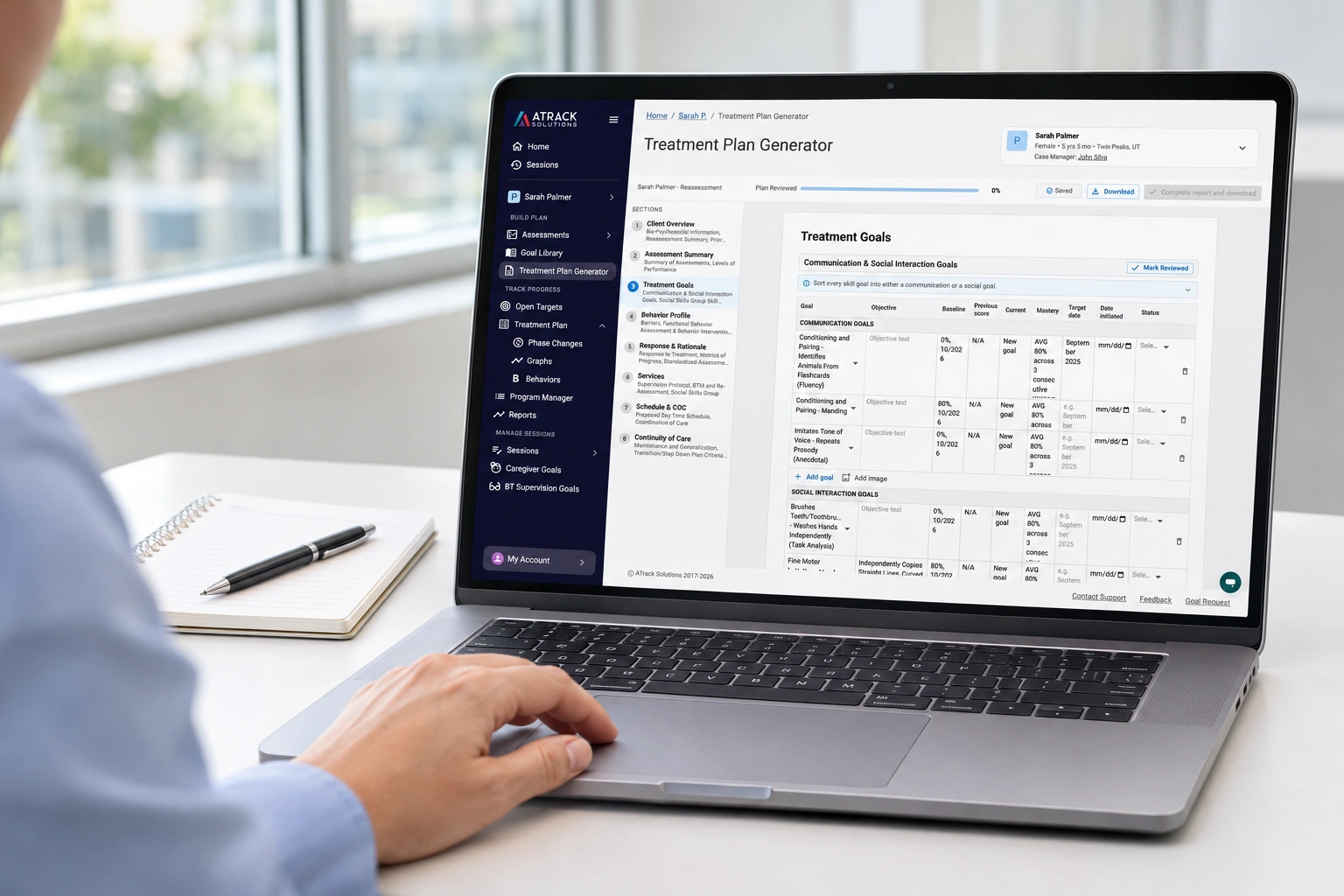
Use the Eight Areas to Build a Connected Account
You can enter information in any section order. The navigation provides a structure for the document without requiring you to write every section in sequence.
| Document area | A useful question for the writer |
|---|---|
| Client Overview | Does the background accurately describe this client and the period being reviewed? |
| Assessment Summary | Are the assessment methods, findings and levels of performance explained? |
| Treatment Goals | Do the objectives and performance details describe the intended outcomes? |
| Behavior Profile | Are relevant definitions, findings and intervention details developed? |
| Response & Rationale | How does the recorded evidence support the proposed care? |
| Services | Do the descriptions match the work being recommended? |
| Schedule & COC | Are the proposed arrangements and coordination of care clear? |
| Continuity of Care | How will maintenance, generalization and changes in care be addressed? |
These questions help you connect the sections. A proposed service should make sense alongside the rationale, schedule and continuity plan. The schedule records proposed arrangements; it does not book sessions.
Develop the Information That Needs Clinical Explanation
The professional responsibility extends beyond filling fields. BACB Ethics Code section 2.16 calls for written intervention objectives, procedures, projected timelines and an ongoing review schedule before implementation. That makes clear documentation part of explaining the planned work to clients and stakeholders, as well as to reviewers. BACB Ethics Code for Behavior Analysts, page 12.
In Treatment Goals, read baseline, current performance and mastery alongside the goal details. Complete the objective, target date, status and other applicable fields. Check whether the wording explains what this client is working toward and how the recorded performance relates to that objective. Writing treatment-plan documentation is distinct from developing or changing the clinical program of goals and targets.
Other areas also require individual attention. In the demonstration’s Behavior Profile, behavior names are populated while definitions, functions and strategies still need clinical documentation. The clinician develops that content from the relevant assessment and record.
Review the source table in Client Overview with the same care. Add standard sources supplies starting rows; retain the sources actually used and explain their role in the plan. This helps another reader trace the account back to the information that informed it.

Put a Relevant Graph Beside Its Interpretation
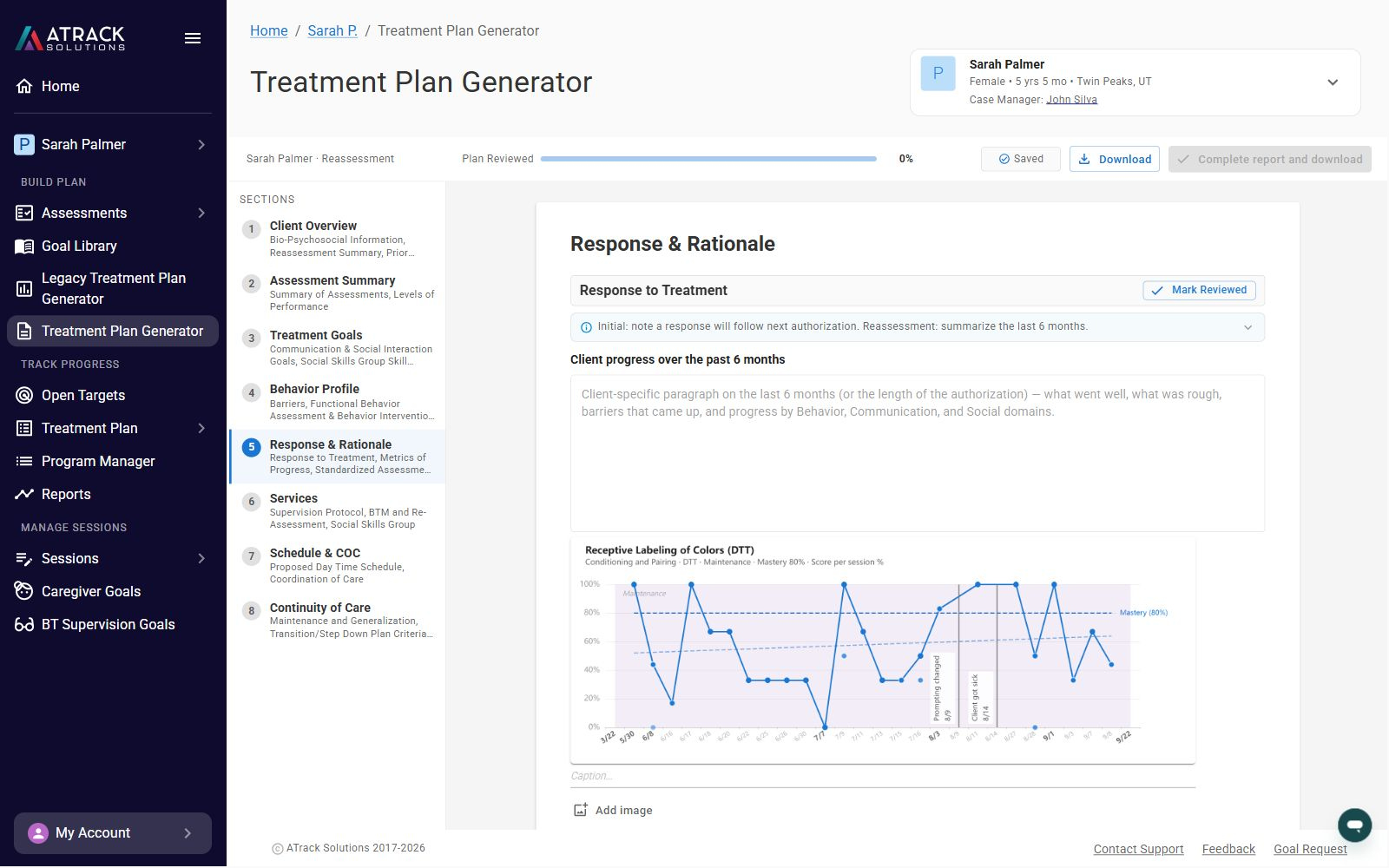
When a graph helps explain progress, choose the appropriate view and reporting period in Treatment Plan → Graphs for the same client. Download the graph as a PNG, return to the saved document, and use Add image → Upload from device where the image belongs.
The inserted graph is a static image of the downloaded view. It will not update when later sessions add data. If the reporting period or source graph changes, review whether the image in the document needs replacing.
Place the image beside an explanation of the pattern and its relevance to the recommendation. Identify the observations being discussed and any recorded context needed to understand them. The reader can then examine the evidence and the clinician’s reasoning together, rather than infer why the graph was included.
Distinguish a Working Download From Completion
The Treatment Plans library holds prior plans and drafts, so you can return to a saved document. Download is available at any time, including before review is complete. Treat that export as a working copy when further checks remain.
Use Mark Reviewed for content you have checked and Not applicable where offered and appropriate. Complete report and download requires every section to be Reviewed or N/A. These controls record review progress; they do not automatically validate the content, determine medical necessity or secure payer approval.
Before completion, read across the entire document. Check that sources, dates, goals, graph images, explanations and requested services agree. Review the current requirements that apply to the client’s payer and your organization’s documentation process. If an explanation is missing or two sections conflict, resolve the question before treating the document as complete.
Make the Next Plan Easier to Follow
Individualized documentation gives the next reader a clear account of the client, the available evidence and the care being proposed. Treatment Plan Generator supplies the structure and editable workspace; your team supplies the clinical explanation and final review. Start with the records that are actually available, develop the connections between sections and complete the report after those connections have been checked.
Request an ATrack walkthrough to explore how your team could bring its records, clinical reasoning and review process together in the next document.